Thursday, February 23, 2012

Sorted index initialization, a simple ordered index template

To specify the sorting order in a more SQL-like fashion, Triceps now has the class SimpleOrderedIndex. It's implemented entirely in Perl, on top of the sorted index. Besides being useful by itself, it shows off two concepts: the initialization function of the sorted index, and the template with code generation on the fly.

First, how to create the ordered indexes:

my $tabType = Triceps::TableType->new($rowType)
  ->addSubIndex("sorted", 
    Triceps::SimpleOrderedIndex->new(
      a => "ASC",
      b => "DESC",
    )
  ) or die "$!";

The constructor takes a list of pairs fieldName => order, where the order is either "ASC" for ascending or "DESC" for descending.

The comparison function gets generated automatically. It's smart enough to generate the string comparisons for the string and uint8 fields, and the numeric comparisons for the numeric fields. It's not smart enough to do the locale-specific comparisons for the strings and locale-agnostic for the unit8, it just uses whatever you have set up in cmp for both. It treats the NULL field values as numeric 0 or empty strings. It doesn't handle the array fields at all but can at least detect such attempts and flag them as errors.

An interesting artifact of the boundary between C++ and Perl is that when you get the index type back from the table type like

$sortIdx = $tabType->findSubIndex("sorted") or die "$!";

the reference stored in $sortIdx will be of  the base type Triceps::IndexType. That's because the C++ internals of the TableType object know nothing about any derived Perl types. But it's no big deal, since there are no other useful methods for SimpleOrderedIndex anyway.

If you call $sortIdx->print(), it will give you an idea of how it was constructed:

PerlSortedIndex(SimpleOrder a ASC, b DESC, )

I'm not sure if I mentioned it yet, but all the index types have the method getKey() that for the hashed index types returns an array of key field names, and for the all other index types returns nothing. This includes the sorted index, and the simple ordered index that is derived from it. In the future I plan to allow returning the key list from the sorted indexes too, but haven't got around to do it yet.

The usage of the tables with these indexes is as with any other indexes. Since the PerlSortedIndex can be used in both leaf and non-leaf position, so can the SimpleOrderedIndex. Nothing special there.

Now the interesting part, the implementation of the sorted index. It's a little biggish for a blog post but not too huge:

package Triceps::SimpleOrderedIndex;
use Carp;

our @ISA = qw(Triceps::IndexType);

sub new # ($class, $fieldName => $direction...)
{
  my $class = shift;
  my @args = @_; # save a copy

  # build a descriptive sortName
  my $sortName = 'SimpleOrder ';
  while ($#_ >= 0) { 
    my $fld = shift;
    my $dir = shift;
    $sortName .= quotemeta($fld) . ' ' . quotemeta($dir) . ', ';
  } 

  $self = Triceps::IndexType->newPerlSorted(
    $sortName, \&init, undef, @args
  ) or confess "$!";
  bless $self, $class;
  return $self;
}

sub init # ($tabt, $idxt, $rowt, @args)
{
  my ($tabt, $idxt, $rowt, @args) = @_;
  my %def = $rowt->getdef(); # the field definition
  my $errors; # collect as many errors as possible
  my $compare = "sub {\n"; # the generated comparison function
  my $connector = "return"; # what goes between the comparison operators

  while ($#args >= 0) {
    my $f = shift @args;
    my $dir = uc(shift @args);

    my ($left, $right); # order the operands depending on sorting direction
    if ($dir eq "ASC") {
      $left = 0; $right = 1;
    } elsif ($dir eq "DESC") {
      $left = 1; $right = 0;
    } else {
      $errors .= "unknown direction '$dir' for field '$f', use 'ASC' or 'DESC'\n";
      # keep going, may find more errors
    }

    my $type = $def{$f};
    if (!defined $type) {
      $errors .= "no field '$f' in the row type\n";
      next;
    }

    my $cmp = "<=>"; # the comparison operator
    if ($type eq "string"
    || $type =~ /^uint8.*/) {
      $cmp = "cmp"; # string version
    } elsif($type =~ /\]$/) {
      $errors .= "can not order by the field '$f', it has an array type '$type', not supported yet\n";
      next;
    }

    my $getter = "->get(\"" . quotemeta($f) . "\")";

    $compare .= "  $connector \$_[$left]$getter $cmp \$_[$right]$getter\n";

    $connector = "||";
  }

  $compare .= "  ;\n";
  $compare .= "}";

  if (defined $errors) {
    # help with diagnostics, append the row type to the error listing
    $errors .= "the row type is:\n";
    $errors .= $rowt->print();
  } else {
    # compile the comparison
    #print STDERR "DEBUG Triceps::SimpleOrderedIndex::init: comparison function:\n$compare\n";
    my $cmpfunc = eval $compare
      or return "Triceps::SimpleOrderedIndex::init: internal error when compiling the compare function:\n"
        . "$@\n"
        . "The generated comparator was:\n"
        . $compare;
    $idxt->setComparator($cmpfunc)
      or return "Triceps::SimpleOrderedIndex::init: internal error: can not set the compare function:\n"
      . "$!\n";
  }
  return $errors;
} 
 

Sorry, but I'm too lazy to wrap the long lines manually, and the @#%^ blog engine doesn't wrap them automatically either. They should really use some less brain-damaged formatting.

The class constructor simply builds the sort name from the arguments and offloads the rest of logic to the init function. It can't really do much more: when the index type object is constructed, it doesn't know yet, where it will be used and what row type it will get. It tries to enquote nicely the weird characters in the arguments when they go into the sort name. Not that much use is coming from it at the moment: the C++ code that prints the table type information doesn't do the same, so there still is a chance of misbalanced quotes in the result. But perhaps the C++ code will be fixed at some point too.

The init function is called at the table type initialization time. By this time all this extra information is known, and it gets the references to the table type, index type (itself, but with the class stripped back to Triceps::IndexType), row type, and whatever extra arguments that were passed through the newPerlSorted(). Now the actual work can begin.

By the way, the sorted index type init function is NOT of the same kind as the aggregator type init function. The aggregator type could use an init function of this kind too, but at the time it looked like too much extra complexity. It probably will be added in the future. But more about aggregators later.

The init function's return value is kind of backwards to everything else: on success it returns undef, on error it returns the error message. It could die too, but simply returning an error message is somewhat nicer.

It goes through all the arguments, looks up the fields in the row type, and checks them for correctness. It tries to collect as much of the error information as possible. The returned error messages may contain multiple lines separated by "\n", and the ordered index makes use of it. The error messages get propagated back to the table type level, nicely indented and returned from the table initialization. If the init function finds any errors, it appends the printout of the row type too, to make finding what went wrong easier. A result of a particularly bad call to a table type initialization may look like this:

index error:
  nested index 1 'sorted':
    unknown direction 'XASC' for field 'z', use 'ASC' or 'DESC'
    no field 'z' in the row type
    can not order by the field 'd', it has an array type 'float64[]', not supported yet
    the row type is:
    row {
      uint8 a,
      uint8[] b,
      int64 c,
      float64[] d,
      string e,
    }

Also as the init goes through the arguments, it constructs the text of the compare function in the variable $compare. Here the use of quotemeta() for the user-supplied strings is important to avoid the syntax errors in the generated code. If no errors are found in the arguments, the compare function gets compiled with eval. There should not be any errors, but it's always better to check. Finally the compiled compare function is set in the sorted index with

$idxt->setComparator($cmpfunc)

This method works only on the PerlSorted index types (it knows how to check internally) and would fail on all others. It replaces any previous compare function set in newPerlSorted(), as well as the extra arguments for it. So really if you use an init function, you would always set the compare function in newPerlSorted() to undef because it will be replaced anyway. If you want to pass extra arguments, you do that as setComparator($cmpfunc, @args). But in this class all the information from the arguments is already compiled into the body of the comparator, and there is no more use for them. The init function absolutely must set the compare function. If the comparator is still undef after the init returns, the initialization will see it as an error.

If you uncomment the debugging printout line (and run "make", and maybe "make install" afterwards), you can see the auto-generated code printed on stderr when you use the simple ordered index. It will look somewhat like this:

sub {
  return $_[0]->get("a") cmp $_[1]->get("a")
  || $_[1]->get("c") <=> $_[0]->get("c")
  || $_[0]->get("b") cmp $_[1]->get("b")
  ;
}

That's it! An entirely new piece functionality added in a smallish Perl snippet. This is your typical Triceps template: collect the arguments, use them to build Perl code, and compile it. Of course, if you don't want to deal with the code generation and compilation, you can just call your class methods and whatnot to interpret the arguments. But if the code will be reused, the compilation is more efficient.

Sorted index

Let's take a short break from the aggregation. For a while I wanted to have an index type that would keep the records in a sorted order. It's convenient for both tests and examples.  But I really didn't want to create yet another version of the indexing code until the table navigation methods are worked out better.

Well, I've been thinking about it and figured out a way to not only reuse but even totally share that code between the hashed index and the new sorted index, pretty much unchanged. And added the sorted indexes for version 1.0.  A sorted index type is created with:

$it = Triceps::IndexType->newPerlSorted($sortName,
  \&initFunc, \&compareFunc, @args);

The "Perl" in "newPerlSorted" refers to the fact that the sorting order is specified as a Perl comparison function.

$sortName is just a symbolic name for printouts. It's used when you call $it->print() (directly or as a recursive call from the table type print) to let you know what kind of index type it is, since it can't print the compiled comparison function. It is also used in the error messages if something dies inside the comparison function: the comparison is executed from deep inside the C++ code, and by that time the sortName is the only way to identify the source of the problems. It's not the same name as used to connect the index type into the table type hierarchy with addSubIndex(). As usual, an index type may be reused in multiple hierarchies, with different names, but in all cases it will also keep the same sortName. This may be easier to show with an example:

$rt1 = Triceps::RowType->new(
  a => "int32",
  b => "string",
) or die "$!";

$it1 = Triceps::IndexType->newPerlSorted("basic", undef, \&compBasic
) or die "$!"; 

$tt1 = Triceps::TableType->new($rt1)
  ->addSubIndex("primary", $it1)
or die "$!"; 

$tt2 = Triceps::TableType->new($rt1)
  ->addSubIndex("first", $it1)
or die "$!";

print $tt1->print(), "\n";
print $tt2->print(), "\n";

will print:

table (
  row {
    int32 a,
    string b,
  }
) {
  index PerlSortedIndex(basic) primary,
}
table (
  row {
    int32 a,
    string b,
  }
) {
  index PerlSortedIndex(basic) first,
}

The initFunc and/or compareFunc references specify the sorting order. One of them may be left undef but not both. @args are the optional arguments that will be passed to both functions.

The easiest but least flexible way  is to just use the compareFunc. It gets two Rows (not RowHandles!) as arguments, plus whatever is specified in @args. It returns the usual Perl-style "<=>" result. For example:

sub compBasic # ($row1, $row2)
{
  return $_[0]->get("a") <=>  $_[1]->get("a");
}

Don't forget to use "<=>" for the numbers and "cmp" for the strings. The typical Perl idiom for sorting by more than one field is to connect them by "||".

Or, if we want to specify the field names as arguments, we could define a sort function that sorts first by a numeric field in ascending order, then by a string field in descending order:

sub compAscDesc # ($row1, $row2, $numFldAsc, $strFldDesc)
{
  my ($row1, $row2, $numf, $strf) = @_;
  return $row1->get($numf) <=> $row2->get($numf)
    || $row2->get($strf) cmp $row1->get($strf); # backwards for descending
}

my $sit = Triceps::IndexType->newPerlSorted("by_a_b", undef,
  \&compAscDesc, "a", "b") or die "$!";

This assumes that the row type will have a numeric field "a" and a string field "b". The problem is that if it doesn't then this will not be discovered until you create a table and try to insert some rows into it, which will finally call the comparison function. Even then it won't be exactly obvious because the comparison function never checks "$!" after get(), and you'll see no failures but all the rows will be considered equal and will replace each other.

You could check that the arguments match the row type ($row1->getType()) in the comparison function but that would add extra overhead, and the Perl comparisons are slow enough as they are.

The initFunc provides a way to do that check and more.

You might also wonder, why isn't there a way to just say as in SQL, "sort by this ascending and that descending"? In short, there eventually will be, and it will be also done in C++ for the better efficiency, but for now a comparison function both provides more flexibility and requires less effort to implement it. The initFunc allows to at least sort of handle this issue for now too. The next post will show, how.

Monday, February 20, 2012

The proper aggregation, part 3 (a cute trick)

Let's look again at the sample aggregation output with row deletion, from the last post:

OP_INSERT,1,AAA,10,10
tWindow.aggrAvgPrice OP_INSERT symbol="AAA" id="1" price="10" 
OP_INSERT,3,AAA,20,20
tWindow.aggrAvgPrice OP_DELETE symbol="AAA" id="1" price="10" 
tWindow.aggrAvgPrice OP_INSERT symbol="AAA" id="3" price="15" 
OP_INSERT,5,AAA,30,30
tWindow.aggrAvgPrice OP_DELETE symbol="AAA" id="3" price="15" 
tWindow.aggrAvgPrice OP_INSERT symbol="AAA" id="5" price="25" 
OP_DELETE,3
tWindow.aggrAvgPrice OP_DELETE symbol="AAA" id="5" price="25" 
tWindow.aggrAvgPrice OP_INSERT symbol="AAA" id="5" price="30" 
OP_DELETE,5
tWindow.aggrAvgPrice OP_DELETE symbol="AAA" id="5" price="30"

When the row with id=3 is deleted, the average price reverts to "30", which is the price of the trade with id=5, not the average of trades with id 1 and 5. This is because when the row with id=5 was inserted, it pushed out the row with id=1. Deleting the record with id=3 does not put that row with id=1 back (you can see the group contents in an even earlier printout with the manual aggregation). Like the toothpaste, once out of the tube, it's not easy to put back.

But for this particular kind of toothpaste there is a trick: keep more rows in the group just in case but use only the last ones for the actual aggregation. To allow an occasional deletion of a single row, we can keep 3 rows instead of 2.

So, change the table definition:

...
       Triceps::IndexType->newFifo(limit => 3)
... 

and modify the aggregator function to use only the last 2 rows from the group, even if more are available:

...
  my $skip = $context->groupSize()-2;
  my $sum = 0;
  my $count = 0;
  for (my $rhi = $context->begin(); !$rhi->isNull();
      $rhi = $context->next($rhi)) {
    if ($skip > 0) {
      $skip--;
      next;
    }
    $count++;
    $sum += $rhi->getRow()->get("price");
  }
  my $rLast = $context->last()->getRow() or die "$!";
  my $avg = $sum/$count;
...

The output from this version becomes:

OP_INSERT,1,AAA,10,10
tWindow.aggrAvgPrice OP_INSERT symbol="AAA" id="1" price="10" 
OP_INSERT,3,AAA,20,20
tWindow.aggrAvgPrice OP_DELETE symbol="AAA" id="1" price="10" 
tWindow.aggrAvgPrice OP_INSERT symbol="AAA" id="3" price="15" 
OP_INSERT,5,AAA,30,30
tWindow.aggrAvgPrice OP_DELETE symbol="AAA" id="3" price="15" 
tWindow.aggrAvgPrice OP_INSERT symbol="AAA" id="5" price="25" 
OP_DELETE,3
tWindow.aggrAvgPrice OP_DELETE symbol="AAA" id="5" price="25" 
tWindow.aggrAvgPrice OP_INSERT symbol="AAA" id="5" price="20" 
OP_DELETE,5
tWindow.aggrAvgPrice OP_DELETE symbol="AAA" id="5" price="20" 
tWindow.aggrAvgPrice OP_INSERT symbol="AAA" id="1" price="10" 

Now after "OP_DELETE,3" the average price becomes 20, the average of 10 and 30, because the row with id=1 comes into play again. Can you repeat that in the SQLy languages?

This version stores one extra row and thus can handle only one deletion (until the deleted row's spot gets pushed out of the window naturally, then it can handle another). It can not handle the arbitrary modifications properly. If you insert another row with id=3 for the same symbol AAA, the new version will be placed again at the end of the window. It it was the last row anyway, that is fine. But if it was not the last, as in this example, that would be an incorrect order that will produce incorrect results.

Sunday, February 19, 2012

The proper aggregation, part 2

And here is an example of the output from the last aggregation example (as usual, the input lines are in italics):

OP_INSERT,1,AAA,10,10
tWindow.aggrAvgPrice OP_INSERT symbol="AAA" id="1" price="10" 
OP_INSERT,3,AAA,20,20
tWindow.aggrAvgPrice OP_DELETE symbol="AAA" id="1" price="10" 
tWindow.aggrAvgPrice OP_INSERT symbol="AAA" id="3" price="15" 
OP_INSERT,5,AAA,30,30
tWindow.aggrAvgPrice OP_DELETE symbol="AAA" id="3" price="15" 
tWindow.aggrAvgPrice OP_INSERT symbol="AAA" id="5" price="25" 
OP_DELETE,3
tWindow.aggrAvgPrice OP_DELETE symbol="AAA" id="5" price="25" 
tWindow.aggrAvgPrice OP_INSERT symbol="AAA" id="5" price="30" 
OP_DELETE,5
tWindow.aggrAvgPrice OP_DELETE symbol="AAA" id="5" price="30" 

As you can see, it's exactly the same as from the manual aggregation example with the helper table, minus the debugging printout of the group contents. However here it's done without the helper table: instead the aggregation function is called before and after each update.

This presents a memory vs CPU compromise: a helper table uses more memory but requires less CPU for the aggregation computations (presumably, the insertion of the row into the table is less computationally intensive than the iteration through the original records).

The managed aggregators can be made to work with a helper table too: just chain a helper table to the aggregator's label, and in the aggregator computation add

return if ($opcode == &Triceps::OP_DELETE
  && $context->groupSize() != 1);

This would skip all the DELETEs except for the last one, before the group collapses.

There is also a way to optimize this logic right inside the aggregator: remember the last INSERT row sent, and on DELETE just resend the same row. This remembered last state can also be used for the other interesting optimizations that will be shown later.

Which approach is better, depends on the particular case. If you need to store the results of aggregation in a table for the future look-ups anyway, then that table is no extra overhead.  That's what the Aleri system does internally: since each element in its model keeps a primary-indexed table ("materialized view") of the result, that table is used whenever possible to generate the DELETEs without involving any logic. Or the extra optimization inside the aggregator can seriously improve the performance on the large groups. Sometimes you may want both.

Now let's look at the example that went wrong with the manual aggregation:

OP_INSERT,1,AAA,10,10
tWindow.aggrAvgPrice OP_INSERT symbol="AAA" id="1" price="10" 
OP_INSERT,3,AAA,20,20
tWindow.aggrAvgPrice OP_DELETE symbol="AAA" id="1" price="10" 
tWindow.aggrAvgPrice OP_INSERT symbol="AAA" id="3" price="15" 
OP_INSERT,5,AAA,30,30
tWindow.aggrAvgPrice OP_DELETE symbol="AAA" id="3" price="15" 
tWindow.aggrAvgPrice OP_INSERT symbol="AAA" id="5" price="25" 
OP_INSERT,5,BBB,30,30
tWindow.aggrAvgPrice OP_DELETE symbol="AAA" id="5" price="25" 
tWindow.aggrAvgPrice OP_INSERT symbol="AAA" id="3" price="20" 
tWindow.aggrAvgPrice OP_INSERT symbol="BBB" id="5" price="30" 
OP_INSERT,7,AAA,40,40
tWindow.aggrAvgPrice OP_DELETE symbol="AAA" id="3" price="20" 
tWindow.aggrAvgPrice OP_INSERT symbol="AAA" id="7" price="30"

Here it goes right. Triceps recognizes that the second INSERT with id=5 moves the row to another group. So it performs the aggregation logic for both groups. First for the group where the row gets removed, it updates the aggregator result with a DELETE and INSERT (note that id became 3, since it's now the last row left in that group). Then the group where the row gets added, and since there was nothing in that group before, it generates only an INSERT.

Saturday, February 18, 2012

The proper aggregation, part1

Since the manual aggregation is error-prone, Triceps can manage it for you and do it right. The only thing you need to do is do the actual iteration and computation. Here is the rewrite of the same example with a Triceps aggregator:

my $uTrades = Triceps::Unit->new("uTrades") or die "$!";

# the input data
my $rtTrade = Triceps::RowType->new(
  id => "int32", # trade unique id
  symbol => "string", # symbol traded
  price => "float64",
  size => "float64", # number of shares traded
) or die "$!";

# the aggregation result
my $rtAvgPrice = Triceps::RowType->new(
  symbol => "string", # symbol traded
  id => "int32", # last trade's id
  price => "float64", # avg price of the last 2 trades
) or die "$!";

# aggregation handler: recalculate the average each time the easy way
sub computeAverage # (table, context, aggop, opcode, rh, state, args...)
{
  my ($table, $context, $aggop, $opcode, $rh, $state, @args) = @_;

  # don't send the NULL record after the group becomes empty
  return if ($context->groupSize()==0
    || $opcode == &Triceps::OP_NOP);

  my $sum = 0;
  my $count = 0;
  for (my $rhi = $context->begin(); !$rhi->isNull();
      $rhi = $context->next($rhi)) {
    $count++;
    $sum += $rhi->getRow()->get("price");
  }
  my $rLast = $context->last()->getRow() or die "$!";
  my $avg = $sum/$count;

  my $res = $context->resultType()->makeRowHash(
    symbol => $rLast->get("symbol"),
    id => $rLast->get("id"),
    price => $avg
  ) or die "$!";
  $context->send($opcode, $res) or die "$!";
}
my $ttWindow = Triceps::TableType->new($rtTrade)
  ->addSubIndex("byId",
    Triceps::IndexType->newHashed(key => [ "id" ])
  )
  ->addSubIndex("bySymbol",
    Triceps::IndexType->newHashed(key => [ "symbol" ])
    ->addSubIndex("last2",
      Triceps::IndexType->newFifo(limit => 2)
      ->setAggregator(Triceps::AggregatorType->new(
        $rtAvgPrice, "aggrAvgPrice", undef, \&computeAverage)
      )
    )
  )
or die "$!";
$ttWindow->initialize() or die "$!";
my $tWindow = $uTrades->makeTable($ttWindow,
  &Triceps::EM_CALL, "tWindow") or die "$!";

# label to print the result of aggregation
my $lbAverage = $uTrades->makeLabel($rtAvgPrice, "lbAverage",
  undef, sub { # (label, rowop)
    print($_[1]->printP(), "\n");
  }) or die "$!";
$tWindow->getAggregatorLabel("aggrAvgPrice")->chain($lbAverage)
  or die "$!";

while(<STDIN>) {
  chomp;
  my @data = split(/,/); # starts with a string opcode
  $uTrades->makeArrayCall($tWindow->getInputLabel(), @data)
    or die "$!";
  $uTrades->drainFrame(); # just in case, for completeness
}

What changed in this code? The things got rearranged a bit.The aggregator is now defined as a part of the table type, so the aggregation result row type and its computational function had to be moved up.

The AggregatorType object holds the information about the aggregator. In the table type, the aggregator type gets attached to an index type with setAggregator(). In this case, to the FIFO index type.  At present an index type may have no more than one aggregator type attached to it. There is no particular reason for that, other than that it was slightly easier to implement, and that I can't think yet of a real-word situation where multiple aggregators on the same index would be needed. If this situation will ever occur, this support can be added. However a table type may have multiple aggregator types in it, on different indexes.  You can save a reference to an aggregator type in a variable and reuse it in the different table types too (though not multiple times in the same table, since that would cause a naming conflict).

The aggregator type is created with the arguments of result row type, aggregator name, group initialization Perl function (which may be undef, as in this example), group computation Perl function, and the optional arguments for the functions. Note that there is a difference in naming between the aggregator types and index types: an aggregator type knows its name, while an index type does not. An index type is given a name only in its hierarchy inside the table type, but it does not know its name.

When a table is created, it finds all the aggregator types in it, and creates an output label for each of them. The names of the aggregator types are used as suffixes to the table name. In this example the aggregator will have its output label named "tWindow.aggrAvgPrice". This puts all the aggregator types in the table into the same namespace, so make sure to give them different names in the same table type. Also avoid the names "in" and "out" because these are already taken by the table's own labels. The aggregator labels in the table can be found with

$aggLabel = $table->getAggregatorLabel("aggName") or die "$!";

The aggregator types are theoretically multithreaded, but for all I can tell, they will not integrate with the Perl multithreading well, due to the way the Perl objects (the execution methods!) are tied to each thread's separate interpreter. In the future expect that the table types with aggregators could not be shared between the threads.

After the logic is moved into a managed aggregator, the main loop becomes simpler. This new main loop also takes advantage of makeArrayCall() to become a little shorter yet. The label $lbAverage now reverts to just printing the rowops going through it, and gets chained to the aggregator output label.

The computation function gets a lot more arguments than it used to. The most interesting and most basic ones are $context, $opcode, and $rh. The rest are useful in the more complex cases only.

The aggregator type is exactly that: a type. It doesn't know, on which table or index, or even index type it will be used, and indeed, it might be used on multiple tables and index types. But to do the iteration on the rows, the computation function needs to get this information somehow. And it does, in the form of aggregator context. The manual aggregation used the last table output row to find, on which exact group to iterate. The managed aggregator gets the last modified row handle as the argument $rh. But our simple aggregator doesn't even need to consult $rh because the context takes care of finding the group too: it knows the exact group and exact index that needs to be aggregated (look at the index tree drawings for the difference between an index type and an index).

The context provides its own begin() and next() methods. They are actually slightly more efficient than the usual table iteration methods because they take advantage of that exact known index. The most important part, they work differently.

$context->next($rhi)

returns a NULL row handle when it reaches the end of the group. Do not, I repeat, DO NOT use the $rhi->next() in the aggregators, or you'll get some very wrong results.

The context also has a bit more of its own magic.

$context->last()

returns the last row handle in the group. This comes very handy because in most of the cases you want the data from the last row to fill the fields that haven't been aggregated as such. This is like the SQL function LAST(). Using the fields from the argument $rh, unless they are the key fields for this group, is generally not a good idea because it adds an extra dependency on the order of modifications to the table. The FIRST() or LAST() (i.e. the context's begin() or last()) are much better and not any more expensive.

$context->groupSize()

returns the number of rows in the group. It's your value of COUNT(*) in SQL terms, and if that's all you need, you don't need to iterate.

$context->send($opcode, $row)

constructs a result rowop and sends it to the aggregator's output label. Remember, the aggregator type as such knows nothing about this label, so the path through the context is the only path. Note also that it takes a row and not a rowop, because a label is needed to construct the rowop in the first place.

 $context->resultType()

provides the result row type needed to construct the result row. For the version 1.0 I've added a couple of convenience methods that combine the row construction and sending, that can be used instead:

$context->makeHashSend ($opcode, $fieldName => $fieldValue, ...)
$context->makeArraySend($opcode, $fieldValue, ...)

The final thing about the aggregator context: it works only inside the aggregator computation function. Once the function returns, all its methods start returning undefs. So there is no point in trying to save it for later in a global variable or such, don't do that.

As you can see, computeAverage() is has the same logic as before, only now uses the aggregation context. And I've removed the debugging printout of the rows in the group.

The last unexplained piece is the opcode handling and that comparison to OP_NOP.  Basically, the table calls the aggregator computation every time something changes in its index. It describes the reason for the call in the argument $aggop ("aggregation operation"). Depending on how clever an aggregator wants to be, it may do something useful on all of these occasions, or only on some of them. The simple aggregator that doesn't try any smart optimizations but just goes and iterates through the rows every time only needs to react in some of the cases. To make its life easier, Triceps pre-computes the opcode that should be used for the result and puts it into the argument $opcode.  So to ignore the non-interesting calls, the simple aggregator computation can just return if it sees the opcode OP_NOP.

Why does it also check for the group  size being 0? Again, Triceps provides flexibility in the aggregators. Among others, it allows to implement the logic like Coral8, when on deletion of the last row in the group the aggregator would send a row with all non-key fields set to NULL (it can take the key fields from the argument $rh). So for this specific purpose the computation function gets called with all rows deleted from the group, and $opcode set to OP_INSERT. And, by the way, a true Coral8-styled aggregator would ignore all the calls where the $opcode is not OP_INSERT. But the normal aggregators need to avoid doing this kind of crap, so they have to ignore the calls where $context->groupSize()==0.

Rowop creation wrappers

When writing the examples, I've got kind of tired of making all these 3-level-nested method calls to pass a set of data to a label. So now I've added a bunch of convenience wrappers for that purpose. The row-sending part from the manual example in computeAverage() now looks much simpler:

  if ($count) {
    $avg = $sum/$count;
    $uTrades->makeHashCall($lbAvgPriceHelper, &Triceps::OP_INSERT,
      symbol => $rhLast->getRow()->get("symbol"),
      id => $rhLast->getRow()->get("id"),
      price => $avg
    );
  } else {
    $uTrades->makeHashCall($lbAvgPriceHelper, &Triceps::OP_DELETE,
      symbol => $rLastMod->get("symbol"),
    );
  }

The full list of the methods added is:

$label->makeRowopHash($opcode, $fieldName => $fieldValue, ...)
$label->makeRowopArray($opcode, $fieldValue, ...)

$unit->makeHashCall($label, $opcode, $fieldName => $fieldValue, ...)
$unit->makeArrayCall($label, $opcode, $fieldValue, ...)

$unit->makeHashSchedule($label, $opcode, $fieldName => $fieldValue, ...)
$unit->makeArraySchedule($label, $opcode, $fieldValue, ...)

$unit->makeHashLoopAt($mark, $label, $opcode, $fieldName => $fieldValue, ...)
$unit->makeArrayLoopAt($mark, $label, $opcode, $fieldValue, ...)

The label methods amount to calling  makeRowHash() or makeRowArray() on their row type, and then wrapping the result into makeRowop(). The unit methods call the new label methods to create the rowop and then call, schedule of loop it. There aren't similar wrappers for forking or general enqueueing because those methods are not envisioned to be used often.

In the future the convenience methods will move into the C++ code and will become not only more convenient but also more efficient.

Thursday, February 16, 2012

The importance of DELETEs

Why did the last example worry so much about the DELETEs? Because without them, relying on just INSERTs for updates, it's easy to create bugs. The last example itself has an issue with handling the row replacement by INSERTs. Can you spot it from reading the code?

Here is run example that highlights the issue (as usual, the input lines are in italics):

OP_INSERT,1,AAA,10,10
Contents:
  id="1" symbol="AAA" price="10" size="10" 
tAvgPrice.out OP_INSERT symbol="AAA" id="1" price="10" 
OP_INSERT,3,AAA,20,20
Contents:
  id="1" symbol="AAA" price="10" size="10" 
  id="3" symbol="AAA" price="20" size="20" 
tAvgPrice.out OP_DELETE symbol="AAA" id="1" price="10" 
tAvgPrice.out OP_INSERT symbol="AAA" id="3" price="15" 
OP_INSERT,5,AAA,30,30
Contents:
  id="3" symbol="AAA" price="20" size="20" 
  id="5" symbol="AAA" price="30" size="30" 
tAvgPrice.out OP_DELETE symbol="AAA" id="3" price="15" 
tAvgPrice.out OP_INSERT symbol="AAA" id="5" price="25" 
OP_INSERT,5,BBB,30,30
Contents:
  id="5" symbol="BBB" price="30" size="30" 
tAvgPrice.out OP_INSERT symbol="BBB" id="5" price="30"
OP_INSERT,7,AAA,40,40
Contents:
  id="3" symbol="AAA" price="20" size="20" 
  id="7" symbol="AAA" price="40" size="40" 
tAvgPrice.out OP_DELETE symbol="AAA" id="5" price="25" 
tAvgPrice.out OP_INSERT symbol="AAA" id="7" price="30" 

The row with id=5 has been replaced to change the symbol from AAA to BBB. This act changes both the groups of AAA and of BBB, removing the row from the first one and inserting it into the second one. Yet only the output for BBB came out. The printout of the next row with id=7 and symbol=AAA shows that the row with id=5 has been indeed removed from the group AAA. It even corrects the result. But until that row came in, the average for the symbol AAA remained unchanged and incorrect.

There are multiple ways to fix this issue but first it had to be noticed. Which requires a lot of attention to detail. It's much better to avoid these bugs in the first place by sending the clean and nice input.

More of the manual aggregation

Returning to the last table example, it prints the aggregated information  (the average price of two records). This can be fairly easily changed to put the information into the rows and send them on as labels. The function printAverage() morphs into computeAverage():

my $rtAvgPrice = Triceps::RowType->new(
  symbol => "string", # symbol traded
  id => "int32", # last trade's id
  price => "float64", # avg price of the last 2 trades
) or die "$!";

# place to send the average: could be a dummy label, but to keep the
# code smalled also print the rows here, instead of in a separate label
my $lbAverage = $uTrades->makeLabel($rtAvgPrice, "lbAverage",
  undef, sub { # (label, rowop)
    print($_[1]->printP(), "\n");
  }) or die "$!";

# Send the average price of the symbol in the last modified row
sub computeAverage # (row)
{
  return unless defined $rLastMod;
  my $rhFirst = $tWindow->findIdx($itSymbol, $rLastMod) or die "$!";
  my $rhEnd = $rhFirst->nextGroupIdx($itLast2) or die "$!";
  print("Contents:\n");
  my $avg;
  my ($sum, $count);
  my $rhLast;
  for (my $rhi = $rhFirst;
      !$rhi->same($rhEnd); $rhi = $rhi->nextIdx($itLast2)) {
    print("  ", $rhi->getRow()->printP(), "\n");
    $rhLast = $rhi;
    $count++;
    $sum += $rhi->getRow()->get("price");
  }
  if ($count) {
    $avg = $sum/$count;
    $uTrades->call($lbAverage->makeRowop(&Triceps::OP_INSERT,
      $rtAvgPrice->makeRowHash(
        symbol => $rhLast->getRow()->get("symbol"),
        id => $rhLast->getRow()->get("id"),
        price => $avg
      )
    ));
  }
}

For the demonstration, the aggregated records sent to $lbAverage get printed. The records being aggregated are printed during the iteration too. And here is a sample run's result, with the input records shown in italics:

OP_INSERT,1,AAA,10,10
Contents:
  id="1" symbol="AAA" price="10" size="10" 
lbAverage OP_INSERT symbol="AAA" id="1" price="10" 
OP_INSERT,3,AAA,20,20
Contents:
  id="1" symbol="AAA" price="10" size="10" 
  id="3" symbol="AAA" price="20" size="20" 
lbAverage OP_INSERT symbol="AAA" id="3" price="15" 
OP_INSERT,5,AAA,30,30
Contents:
  id="3" symbol="AAA" price="20" size="20" 
  id="5" symbol="AAA" price="30" size="30" 
lbAverage OP_INSERT symbol="AAA" id="5" price="25" 
OP_DELETE,3
Contents:
  id="5" symbol="AAA" price="30" size="30" 
lbAverage OP_INSERT symbol="AAA" id="5" price="30" 
OP_DELETE,5
Contents:

There are a couple of things to notice about it: it produces only the INSERT rowops, no DELETEs, and when the last record of the group is removed, that event produces nothing.

The first item is mildly problematic because the processing downstream from here might not be able to handle the updates properly without the DELETE rowops. It can be worked around fairly easily by connecting another table, with the same primary key as the aggregation key, to store the aggregation results. That table would automatically transform the repeated INSERTs on the same key to a DELETE-INSERT sequence.

The second item is actually pretty bad because it means that the last record deleted gets stuck in the aggregation results. The Coral8 solution for this situation is to send a row with all non-key fields set to NULL, to reset them (interestingly, it's a relatively recent addition, that bug took Coral8 years to notice). But with the opcodes available, we can as well send a DELETE rowop with a similar contents, the helper table will fill in the rest of the fields, and produce a clean DELETE.

All this can be done by the following changes. Add the table, remember its input label in $lbAvgPriceHelper. It will be used to send the aggregated rows instead of $tAvgPrice.

my $ttAvgPrice = Triceps::TableType->new($rtAvgPrice)
  ->addSubIndex("bySymbol",
    Triceps::IndexType->newHashed(key => [ "symbol" ])
  )
or die "$!";
$ttAvgPrice->initialize() or die "$!";
my $tAvgPrice = $uTrades->makeTable($ttAvgPrice,
  &Triceps::EM_CALL, "tAvgPrice") or die "$!";
my $lbAvgPriceHelper = $tAvgPrice->getInputLabel() or die "$!";

Then still use $tAvgPrice to print the records coming out, but now connect it after the helper table:

$tAvgPrice->getOutputLabel()->chain($lbAverage) or die "$!";

And in computeAverage() change the destination label and add the case for when the group becomes empty:

...
  if ($count) {
    $avg = $sum/$count;
    $uTrades->call($lbAvgPriceHelper->makeRowop(&Triceps::OP_INSERT,
      $rtAvgPrice->makeRowHash(
        symbol => $rhLast->getRow()->get("symbol"),
        id => $rhLast->getRow()->get("id"),
        price => $avg
      )
    ));
  } else {
    $uTrades->call($lbAvgPriceHelper->makeRowop(&Triceps::OP_DELETE,
      $rtAvgPrice->makeRowHash(
        symbol => $rLastMod->get("symbol"),
      )
    ));
  }
...

Then the output of the same example becomes:

OP_INSERT,1,AAA,10,10Contents:
  id="1" symbol="AAA" price="10" size="10" 
tAvgPrice.out OP_INSERT symbol="AAA" id="1" price="10" 
OP_INSERT,3,AAA,20,20
Contents:
  id="1" symbol="AAA" price="10" size="10" 
  id="3" symbol="AAA" price="20" size="20" 
tAvgPrice.out OP_DELETE symbol="AAA" id="1" price="10" 
tAvgPrice.out OP_INSERT symbol="AAA" id="3" price="15" 
OP_INSERT,5,AAA,30,30
Contents:
  id="3" symbol="AAA" price="20" size="20" 
  id="5" symbol="AAA" price="30" size="30" 
tAvgPrice.out OP_DELETE symbol="AAA" id="3" price="15" 
tAvgPrice.out OP_INSERT symbol="AAA" id="5" price="25" 
OP_DELETE,3
Contents:
  id="5" symbol="AAA" price="30" size="30" 
tAvgPrice.out OP_DELETE symbol="AAA" id="5" price="25" 
tAvgPrice.out OP_INSERT symbol="AAA" id="5" price="30" 
OP_DELETE,5
Contents:
tAvgPrice.out OP_DELETE symbol="AAA" id="5" price="30" 

All fixed, the proper DELETEs are coming out.

Sunday, February 12, 2012

The index tree, part 3

Continuing our excursion into the internals of the table, the next example is of two parallel leaf index types:

TableType
+-IndexType A
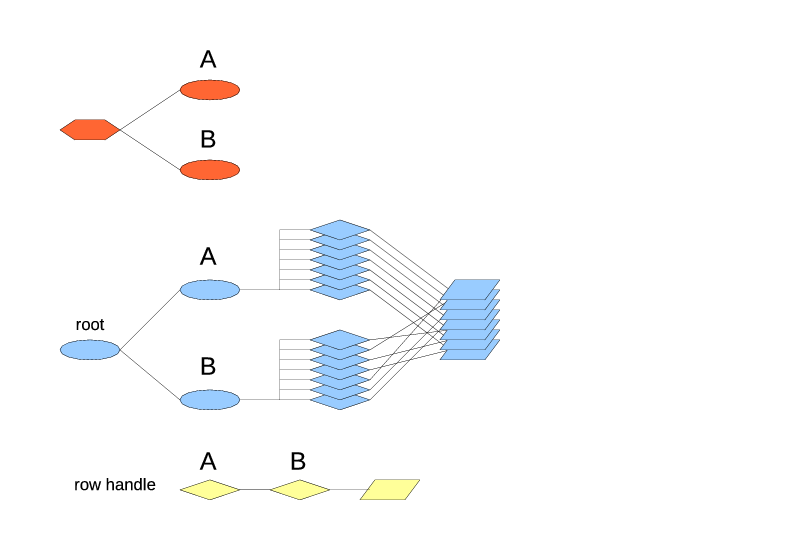
+-IndexType B

The resulting internal arrangement is shown on Fig. 8.

Fig. 8 Two top-level index types.

Each index type produces exactly one index under the root (since the top-level index types always produce one index). Both indexes contain the same number of rows, and exactly the same rows. When a row is added to the table, it's added to all the leaf index types (one actual index of each type). When a row is deleted from the table, it's deleted from all the leaf index types. So the total is always the same. However the order of rows in the indexes may differ. The drawing shows the row references stacked in the same order as the index A because the index A is of the first leaf index type, and as such is the default one for the iteration.

The row handle contains the iterators for both paths, A and B. It's pretty normal to find a row through one index type and then iterate from there using the other index type.

The next example on Fig. 9 has a "primary" index with a unique key and a "secondary" index that groups the records:

TableType
+-IndexType A
+-IndexType B
  +-IndexType C

Fig. 9. A "primary" and "secondary" index type.

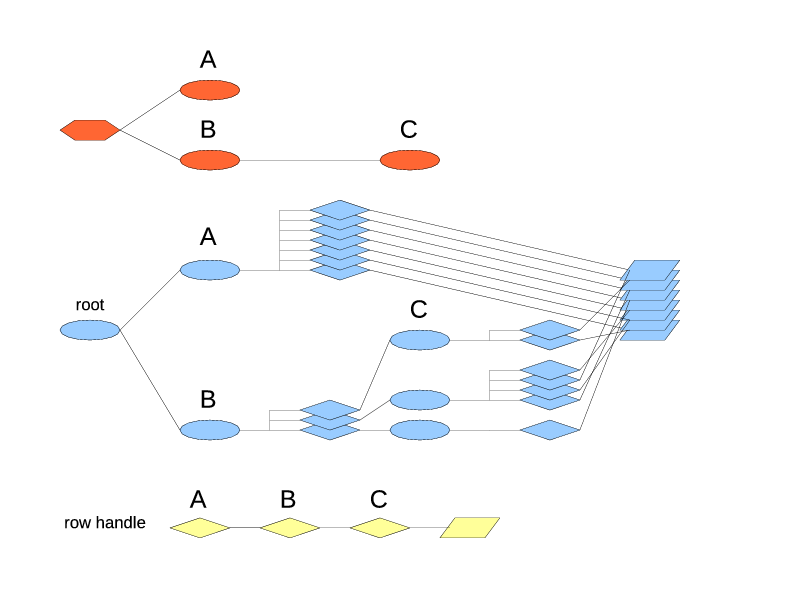
The index type A still produces one index and references all the rows directly. The index of type B produces the groups, with each group getting an index of type C. The total set of rows referrable through A and through B is still the same but through B they are split into multiple groups.

And Fig. 10 shows two leaf index types nested under one non-leaf.

TableType
+-IndexType A
  +-IndexType B
  +-IndexType C

Fig. 10. Two index types nested under one.

As usual, there is only one index of type A, and it splits the rows into groups. The new item in this picture is that each group has two indexes in it: one of type B and one of type C. Both indexes in the group contain the same rows. They don't decide, which rows they get. The index A decides, which rows go into which group. Then if the group 1 contains two rows, indexes B1 and C1, would both contain two rows each, the exact same set. The stack of row references has been visually split by groups to make this point more clear.

This happens to be a pretty useful arrangement: for example, B might be a hash index type, or in the future, a sorted index type, allowing to find the records by the key (and for the sorted index, to iterate in the order of keys), while C might be a FIFO index, keeping the insertion order, and maybe keeping the window size limited.

That's pretty much it for the basic index topologies. Some much more complex index trees can be created, but they would be the combinations of the examples shown. Also, don't forget that every extra index type adds overhead in both memory and CPU time, so avoid adding indexes that are not needed.

One more fine point has to do with the replacement policies. Consider that we have a table that contains the rows with the single field:

id int32

And the table type has two indexes:

TableType
+-IndexType "A" HashIndex key=(id)
+-IndexType "B" FifoIndex limit=3

Then we send there the rowops:

INSERT id=1
INSERT id=2
INSERT id=3
INSERT id=2

The second insert of id=2 triggers the replacement policy in both index types. In the index A it is a duplicate key and will cause the removal of the previous row with id=2. In the index B it overflows the limit and pushes out the oldest row, the one with id=1. If both records get deleted, the resulting table contents will be 2 rows (shown in FIFO order):

id=3
id=2

Which is probably not the best outcome. It might be tolerable with a FIFO index and a hashed index but gets even more annoying if there are two FIFO index types in the table: one top-level limiting the total number of rows, another one nested under a hashed index, limiting the number of rows per group, and they start conflicting this way with each other.

So the FIFO index is actually smart enough to avoid such problems: it looks at what the preceding indexes have decided to remove, checks if any of these rows belong to its group, and adjusts its calculation accordingly. In this example the index B will find out that the row with id=2 is already displaced by the index A. That leaves only 2 rows in the index B, so adding a new one will need no displacement. The resulting table contents will be

id=1
id=3
id=2

However here the order of index types is important. If the table were to be defined as

TableType
+-IndexType "B" FifoIndex limit=3
+-IndexType "A" HashIndex key=(id)

then the replacement policy of the index type B would run first, find that nothing has been displaced yet, and displace the row id=1. After that the replacement policy of the index type A will run, and being a hashed index, it doesn't have a choice, it has to replace the row id=2. And both rows end up displaced.

If the situations with automatic replacement of rows by the keyed indexes may arise, always make sure to put the keyed leaf index types before the FIFO leaf index types. However if you always diligently send a DELETE before the INSERT of the new version of the recond, then this problem won't occur and the order of index types will not matter.

Saturday, February 11, 2012

The index tree, part 2

Let's use the Fig. 3 from the last post to go through how the other index-related operations work.

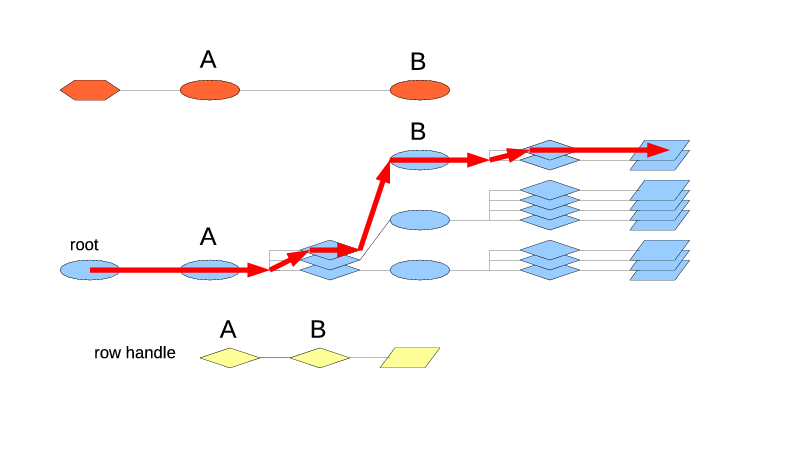
The iteration through the whole table starts with begin() or beginIdx(), the first being a form of the second that always uses the first leaf index type. BeginIdx() is fairly straightforward: it just follows the path from the root to the leaf, picking the first position in each index along the way, until it hits the RowHandle, as is shown in Fig. 4. That found RowHandle becomes its result. If the table is empty, it returns the NULL row handle.

If you specify a non-leaf index type as an argument of beginIdx(), the look-up can not just stop there because the non-leaf indexes are not directly connected to the row handles. It has to go through the whole chain to a leaf index. So, for a non-leaf index type argument the look-up is silently extended to its first leaf index type.

Fig. 4. Begin(), beginIdx($itA) and beginIdx($itB) work the same for this table.

The next pair is find() and findIdx(). As usual, find() is the same thing as findIdx() on the table's first leaf index type. It also follows the path from the root to the target index type. On each step it tries to find a matching position in the current index. If the position could not be found, the search fails and a NULL row handle is returned. If found, it is used to progress to the next index.

As has been mentioned before, the search always works internally on a RowHandle argument. If a plain Row is used as an argument, a new temporary RowHandle will be created for it, searched, and then freed after the search. This works well for two reasons. First, the indexes already have the functions for comparing two row handles to build their ordering. The same functions are reused for the search. Second, the row handles contain not only the index iterators but also the cached information from the rows, to make the comparisons faster. The exact kind of cached information varies by the index type. The FIFO indexes use none. The hashed indexes calculate a hash of the key field values, that will be used as a quick differentiator for the search. This information gets created when the row handle gets created. Whether the row handle is then used to insert into the table or to search in it, it's then used in the same way, to speed up the comparisons.

For findIdx(), the non-leaf index type arguments behave differently than the leaf ones: up to and including the index of the target type, the search works as usual. But then at the next level the logic switches to the same as in beginIdx(), going for the first row handle of the first leaf sub-index. This lets you find the first row handle of the matching group under the target index type.

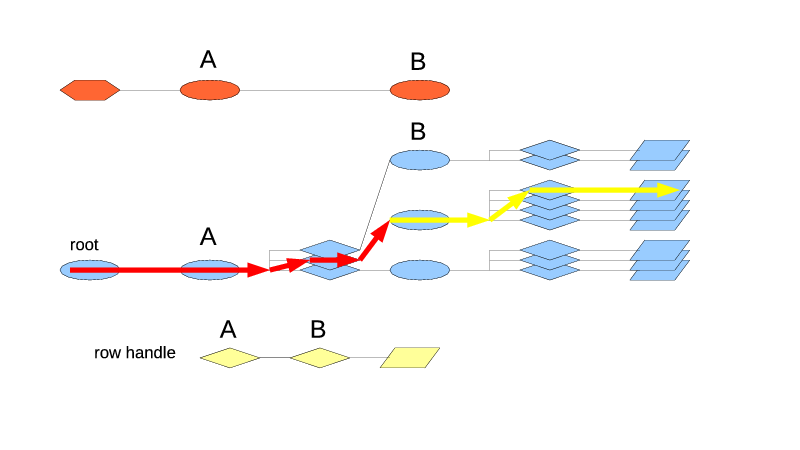
If you use $table->findIdx($itA, $rh), on Fig. 5 it will go through the root index to the index A. There it will try to find the matching position. If none is found, the search ends and returns a NULL row handle. If the position is found, the search progresses towards the first leaf sub-index type. Which is the index type B, and which conveniently sits in this case right under A. The position in the index A determines, which index of type B will be used for the next step. Suppose it's the second position, so the second index of type B is used. Since we're now past the target index A, the logic used is the same as for beginIdx(), and the first position in B2 is picked. Which then leads to the first row handle of the second sub-stack of handles.

Fig. 5 FindIdx($itA, $rh) goes through A and then switches to the begin() logic.


The method firstOfGroupIdx() allows to navigate within a group, to jump from some row somewhere in the group to the first one, and then from there iterate through the group. The example of manual aggregation made use of it.

The Fig. 6 shows the example of $table->firstOfGroupIdx($itB, $rh), where $rh is pointing to the third record in B2. What it needs to do is go back to B2, and then execute the begin() logic from there on. However, remember, the row handle does not have a pointer to the indexes in the path, it only has the iterators. So, to find B2, the method does not really back up from the original row. It has to start back from the root and follow the path to B2 using the iterators in $rh. Since it uses the ready iterators, this works fast and requires no row comparisons. Once B2 (an index of type B) is reached, it goes for the first row in there.

FirstOfGroupIdx() works on both leaf and non-leaf index type arguments in the same way: it backs up from the reference row to the index of that type and executes the begin() logic from there. Obviously, if you use it on a non-leaf index type, the begin()-like part will follow its first leaf index type.

Fig. 6. FirstOfGroupIdx($itB, $rh)


The method nextGroupIdx() jumps to the first row of the next group, according to the argument index type. To do that, it has to retrace one level higher than firstOfGroupIdx(). Fig. 7 shows that $table->nextGroupIdx($itB, $rh) that starts from the same row handle as Fig. 6, has to logically back up to the index A, go to the next iterator there, and then follow to the first row of B3.

As usual, in reality there is no backing up, just the path is retraced from the root using the iterators in the row handle. Once the parent of index type B is reached (which is the index of type A), the path follows not the iterator from the row handle but the next one (yes, copied from the row handle, increased, followed). This gives the index of type B that contains the next group. And from there the same begin()-like logic finds its first row.

Same as firstOfGroupIdx(), nextGroupIdx() may be used on both the leaf and non-leaf indexes, with the same logic.

Fig. 7. NextGroupIdx($itB, $rh)

It's kind of annoying that firstOfGroupIdx() and nextGroupIdx() take the index type inside the group while findIdx() uses takes the parent index type to act on the same group. But as you can see, each of them follows its own internal logic, and I'm not sure if they can be reconciled to be more consistent.

At the moment the only navigation is forward. There is no matching last(), prev() or lastGroupIdx() or prevGroupIdx(). They are in the plan, but so far they are the victims of corner-cutting.

The index tree, part 1

The index types in a table type can form a pretty much arbitrary tree. Following the common tree terminology, the index types that have no other index types nested in them, are called the leaf index types. Since there seems to be no good one-word naming for the index types that have more index types nested in them ("inner"? "nested" is too  confusing), I simply call them non-leaf.

At the moment the Hashed index types can be used only in both leaf and non-leaf positions. The FIFO index types must always be in the leaf position, they don't allow the further nesting.

Now is the moment to look deeper into what is going on inside a table. Note that I've been very carefully talking about "index types" and not "indexes". In this post the difference matters. The index types are in the table type, the indexes are in the table. One index type may generate multiple indexes.

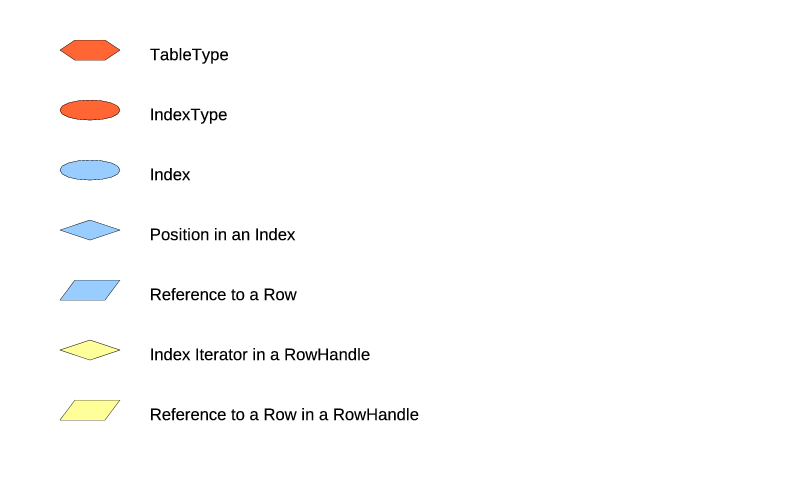
This will become clearer after you see the illustrations. I really hate doing the drawings, but here they are really necessary for the understanding, and way too complex for the ASCII-art. But first, the legend on Fig. 1.


Fig. 1. Drawings legend.


The nodes belonging to the table type are shown in red, the nodes belonging in the table are shown in blue, and the contents of the RowHandle is shown separately in yellow. The lines on the drawings represent not exactly pointers as such but more of the logical connections that may be more complicated than the simple pointers.

The lines in the RowHandle don't mean anything at all, they just show that the parts go together. In reality a RowHandle is a chunk of memory, with various elements placed in that memory. As far as indexes are concerned, the RowHandle contains an iterator for every index where it belongs. This lets it know its position in the table, to iterate along every index, and, most importantly, to be removed quickly from every index. A RowHandle belongs to one index of each index type, and contains the matching number of iterators in it.

The table type is shown as a normal flat tree. But the table itself is more complex and becomes 3-dimensional. Its "view from above" matches the table type's tree but the data grows "up" in the third dimension.

Let's start with the simplest case: a table type with only one index type. Whether the index type is hash or FIFO, doesn't matter here.

TableType
+-IndexType "A"

Fig. 2 shows the table structure.

Fig. 2. One index type.


The table here always contains exactly one index, matching the one defined index type, and the root index. The root index is very dumb, its only purpose is to tie together the multiple top-level indexes into a tree.

The only index of type A provides an ordering of the records, and this ordering is used for the iteration on the table.

For the next example let's look at the straight nesting at fig. 3.

TableType
+-IndexType "A"
  +-IndexType "B"

Fig. 3. Straight nesting.
The stack of row references is shown visually divided to match the indexing, but in reality there is no special division. This was done purely to make the picture easier to read.

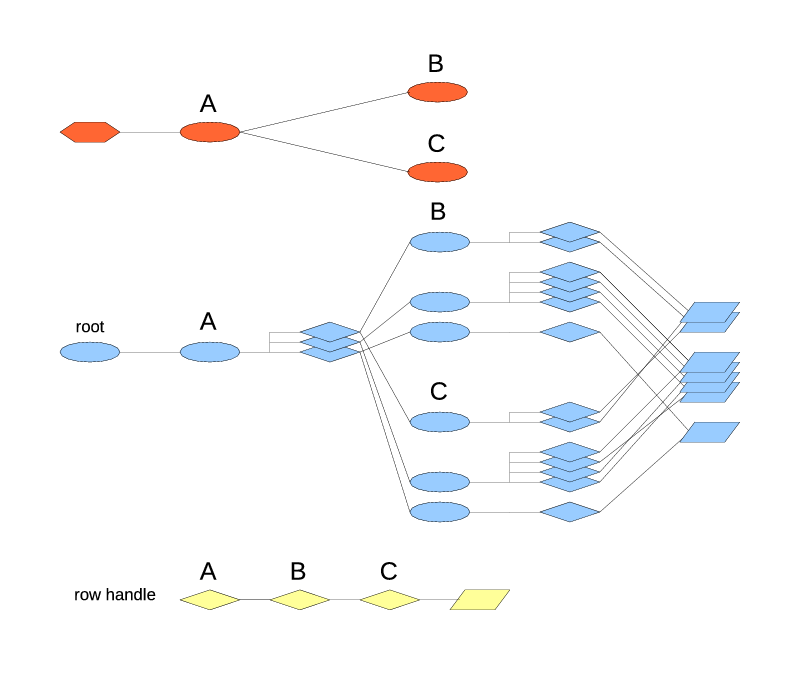
There is still only one index of type A. And this is always the case with the top-level indexes, there is only one of them. This index divides the rows into 3 groups. Just like the rows in a leaf index, the groups in a non-leaf index are ordered in some way.

Each group then has its own second-level index of type B. Which then defines an order for the rows in it. To reiterate: the index of type A splits the rows by groups, then the group's index of type B defines the order of the rows in the group.

So what happens when we iterate through the table and ask for the next row handle? The current row handle contains the iterators in the indexes of types A and B. The easy thing is to advance the iterator of type B. Yeah, but in which index? The figure shows 3 indexes of type B, let's call them B1, B2 and B3. The iterator of type B in the row handle tells the relative position in the index, but it doesn't tell, which index it is. We need to step back and look at the index type A. It's the top-level index type, so there is always only one index for it. Then we take the iterator of type A and find this row's group in the index A. The group contains the index of type B, say B1. We can then take this index B1, take the iterator of type B from the row handle, and advance this iterator in this index. If the advance succeeded, then great, we've got the next row handle. But if the current row was the last row in B1, we need to step back to the index A again, advance the current row handle's iterator of type A there, find its index B2, and pick the first row handle of B2.

This process is what happens when we say $table->nextIdx($itB, $rh) or equivalently $rh->nextIdx($itB). The iteration goes by the leaf index type B, however it relies on all the index types in the path from the table type to B. If we do $rh->next(), the result is the same because the first leaf index type is used as the default index type for the iteration.

If we do $rh->next($itA),  the semantics is still the same: return the next row handle (not the next group). There is no way to get to the row handle without going all the way through a leaf index. So when a non-leaf index type is used for the iteration, it gets implicitly extended to its first nested leaf index type.

What would happen if a new row gets inserted, and the index type A determines that it does not belong to any of the existing groups? A new group will be created and inserted in the appropriate position in A's order. This group will have a new index of type B created, and the new row inserted in that index.

What would happen if both rows in B1 are removed? B1 will become empty and will be collapsed. The index A will delete the B1's group and B1 itself, and will remain with only two groups. The effect propagates upwards: if all the rows are removed, the last index of type B will collapse, then the index A will become empty and also collapse and be deleted. The only thing left will be the root index that stays in the existence no matter what.

When a table is first created, it has only the root index. The rest of the indexes pop into the existence as the rows get inserted. If you wonder, yes, this does apply to a table type with only one index type as well. Just this point has not been brought up until now.

Among all this froth of creation and collapse the iterators stay stable. Once a row is inserted, the indexes leading to it are not going anywhere (at least until that row gets removed). But since other rows and groups may be inserted around it, the notion of what row is next, will change over time.

Tuesday, February 7, 2012

Secondary indexes

The last example dealt only with the row inserts, because it could not handle the deletions that well. What if the trades may get cancelled and have to be removed from the table? There is a solution to this problem: add one more index. Only this time not nested but in parallel. The indexes in the table type become tree-formed:

TableType
+-IndexType Hash "byId" (id)
+-IndexType Hash "bySymbol" (symbol)
  +-IndexType Fifo "last2"

It's very much like the common relational databases where you can define multiple indexes on the same table. Both indexes byId and bySymbol (together with its nested sub-index) refer to the same set of rows stored in the table. Only byId allows to easily find the records by the unique id, while bySymbol is responsible for keeping then grouped by the symbol, in FIFO order. It could be said that byId is the primary index (since it has a unique key) and bySymbol is a secondary one (since it does the grouping) but from the Triceps'es standpoint they are pretty much equal and parallel to each other.

To illustrate the point, here is a modified version of the previous example.

my $uTrades = Triceps::Unit->new("uTrades") or die "$!";
my $rtTrade = Triceps::RowType->new(
  id => "int32", # trade unique id
  symbol => "string", # symbol traded
  price => "float64",
  size => "float64", # number of shares traded
) or die "$!";

my $ttWindow = Triceps::TableType->new($rtTrade)
  ->addSubIndex("byId",
    Triceps::IndexType->newHashed(key => [ "id" ])
  )
  ->addSubIndex("bySymbol",
    Triceps::IndexType->newHashed(key => [ "symbol" ])
      ->addSubIndex("last2",
        Triceps::IndexType->newFifo(limit => 2)
      )
  )
or die "$!";
$ttWindow->initialize() or die "$!";
my $tWindow = $uTrades->makeTable($ttWindow,
  &Triceps::EM_CALL, "tWindow") or die "$!";

# remember the index type by symbol, for searching on it
my $itSymbol = $ttWindow->findSubIndex("bySymbol") or die "$!";
# remember the FIFO index, for finding the start of the group
my $itLast2 = $itSymbol->findSubIndex("last2") or die "$!";

# remember, which was the last row modified
my $rLastMod;
my $lbRememberLastMod = $uTrades->makeLabel($rtTrade, "lbRememberLastMod",
  undef, sub { # (label, rowop)
    $rLastMod = $_[1]->getRow();
  }) or die "$!";
$tWindow->getOutputLabel()->chain($lbRememberLastMod) or die "$!";

# Print the average price of the symbol in the last modified row
sub printAverage # (row)
{
  return unless defined $rLastMod;
  my $rhFirst = $tWindow->findIdx($itSymbol, $rLastMod) or die "$!";
  my $rhEnd = $rhFirst->nextGroupIdx($itLast2) or die "$!";
  print("Contents:\n");
  my $avg;
  my ($sum, $count);
  for (my $rhi = $rhFirst;
      !$rhi->same($rhEnd); $rhi = $rhi->nextIdx($itLast2)) {
    print("  ", $rhi->getRow()->printP(), "\n");
    $count++;
    $sum += $rhi->getRow()->get("price");
  }
  if ($count) {
    $avg = $sum/$count;
  }
  print("Average price: $avg\n");
}

while(<STDIN>) {
  chomp;
  my @data = split(/,/);
  my $op = shift @data; # string opcode, if incorrect then will die later
  my $rTrade = $rtTrade->makeRowArray(@data) or die "$!";
  my $rowop = $tWindow->getInputLabel()->makeRowop($op, $rTrade)
    or die "$!";
  $uTrades->call($rowop) or die "$!";
  &printAverage();
  undef $rLastMod; # clear for the next iteration
  $uTrades->drainFrame(); # just in case, for completeness
}

And an example of its work, with the input lines shown in italics:

OP_INSERT,1,AAA,10,10
Contents:
  id="1" symbol="AAA" price="10" size="10" 
Average price: 10
OP_INSERT,2,BBB,100,100
Contents:
  id="2" symbol="BBB" price="100" size="100" 
Average price: 100
OP_INSERT,3,AAA,20,20
Contents:
  id="1" symbol="AAA" price="10" size="10" 
  id="3" symbol="AAA" price="20" size="20" 
Average price: 15
OP_INSERT,4,BBB,200,200
Contents:
  id="2" symbol="BBB" price="100" size="100" 
  id="4" symbol="BBB" price="200" size="200" 
Average price: 150
OP_INSERT,5,AAA,30,30
Contents:
  id="3" symbol="AAA" price="20" size="20" 
  id="5" symbol="AAA" price="30" size="30" 
Average price: 25
OP_INSERT,6,BBB,300,300
Contents:
  id="4" symbol="BBB" price="200" size="200" 
  id="6" symbol="BBB" price="300" size="300" 
Average price: 250
OP_DELETE,3
Contents:
  id="5" symbol="AAA" price="30" size="30" 
Average price: 30
OP_DELETE,5
Contents:
Average price: 

The input has changed: now an extra column is prepended to it, containing the opcode for the row. The updates to the table are not printed any more, but the calculated average price is printed after the new contents of the group.

In the code, the first obvious addition is the extra index in the table type. The label that used to print the updates is gone, and replaced with another one, that remembers the last modified row in a global variable.

That last modified row is then used in the function printAverage(). Why? As you can see in the last two input rows with OP_DELETE, the trade id is the only field required to find and delete a row using the index byId. However to print the group contents by symbol, we need to know the symbol. If we try to find the symbol by looking up the row after the deletion, we will find nothing, because the row will already be deleted. We could look up the row in the table before the deletion, and remember it,  and afterwards do the look-up of the group by it. But since on deletion the row with  will come to the table's output label anyway, we can just remember it instead of doing the first manual look-up.

Note that in this example, unlike the previous one, there are no two ways of finding the group any more: after deletion the row handle will not be in the table any more, and could not be used to jump directly to the beginning of its group.

In printAverage() it could happen that all the rows of that symbols will be gone, and the group will disappear. This situation is handled nicely: findIdx() will return a NULL row handle, with which then nextGroupIdx() will also return a NULL row handle. The for-loop will make no iterations, the $count will be 0 (or, well, undefined), the $avg will be left undefined as well. In result no rows and no average value are printed, as you can see in the reaction to the last input row in the sample ouput.

The main loop then gets reduced to reading the input, splitting the line, separating the opcode, calling the table's input label, and printing the average. The auto-conversion from the opcode name is used when constructing the rowop. Normally it's not a good practice, since the program will die if it finds a bad rowop in the input, but good enough for a small example. Directly using $uTrades->call() instead of schedule() is also a little unorthodox but perfectly fine. In this particular case either way doesn't matter. However with call() the whole code can be transplanted into a label's handler function as is, with average being calculated immediately after the table changes.

After the average is calculated, $rLastMod is reset to prevent it from accidentally affecting the next row, if the next row is an attempt to delete a trade id that is not in the table any more.

The final $uTrades->drainFrame() is there purely for completeness. In this case we know that nothing will be scheduled by the labels downstream from the table, and there will be nothing to drain.

Now, an interesting question is: how does the table know, that to delete a row, it has to find it using the field id? Or, since the deletion internally uses find(), the more precise question is: how does find() know that it has to use the index byId? It doesn't use any magic. It simply goes by the first index defined in the table. That's why the index byId has been very carefully placed before bySymbol. The same principle applies to all the other functions like next(), that use an index but don't receive one as an argument: the first index is always the default index.

Sunday, February 5, 2012

A window is a FIFO

A fairly typical situation in the CEP world is when a model needs to keep a limited history of events. For a simple example, let's discuss, how to remember the last two trades per stock symbol. The size of two has been chosen to keep the sample input and outputs small.

This is normally called a window logic, with a sliding window. You can think of it in a mechanical analogy: as the trades become available, they get printed on a long tape. However the tape is covered with a masking plate. The plate has a window cut in it that lets you see only the last two trades.

Some CEP systems have the special data structures that implement this logic, that are called windows. Triceps has a feature on a table instead that makes a table work as a window. It's not unique in this department: for example Coral8 does the opposite, calls everything a window, even if some windows are really tables in every regard but name.

In Triceps it's done like this (the usual preamble is not shown):

my $uTrades = Triceps::Unit->new("uTrades") or die "$!";
my $rtTrade = Triceps::RowType->new(
  id => "int32", # trade unique id
  symbol => "string", # symbol traded
  price => "float64",
  size => "float64", # number of shares traded
) or die "$!";

my $ttWindow = Triceps::TableType->new($rtTrade)
  ->addSubIndex("bySymbol",
    Triceps::IndexType->newHashed(key => [ "symbol" ])
      ->addSubIndex("last2",
        Triceps::IndexType->newFifo(limit => 2)
      )
  )
or die "$!";
$ttWindow->initialize() or die "$!";
my $tWindow = $uTrades->makeTable($ttWindow,
  &Triceps::EM_CALL, "tWindow") or die "$!";

# remember the index type by symbol, for searching on it
my $itSymbol = $ttWindow->findSubIndex("bySymbol") or die "$!";
# remember the FIFO index, for finding the start of the group
my $itLast2 = $itSymbol->findSubIndex("last2") or die "$!";

# print out the changes to the table as they happen
my $lbWindowPrint = $uTrades->makeLabel($rtTrade, "lbWindowPrint",
  undef, sub { # (label, rowop)
    print($_[1]->printP(), "\n"); # print the change
  }) or die "$!";
$tWindow->getOutputLabel()->chain($lbWindowPrint) or die "$!";
while(<STDIN>) {
  chomp;
  my $rTrade = $rtTrade->makeRowArray(split(/,/)) or die "$!";
  my $rhTrade = $tWindow->makeRowHandle($rTrade) or die "$!";
  $tWindow->insert($rhTrade) or die "$!"; # return of 0 is an error here
  # There are two ways to find the first record for this
  # symbol. Use one way for the symbol AAA and the other for the rest.
  my $rhFirst;
  if ($rTrade->get("symbol") eq "AAA") {
    $rhFirst = $tWindow->findIdx($itSymbol, $rTrade) or die "$!";
  } else  {
    # $rhTrade is now in the table but it's the last record
    $rhFirst = $rhTrade->firstOfGroupIdx($itLast2) or die "$!";
  }
  my $rhEnd = $rhFirst->nextGroupIdx($itLast2) or die "$!";
  print("New contents:\n");
  for (my $rhi = $rhFirst;
      !$rhi->same($rhEnd); $rhi = $rhi->nextIdx($itLast2)) {
    print("  ", $rhi->getRow()->printP(), "\n");
  }
}

This example reads the trade records in CSV format, inserts them into the table, and then prints the actual modifications reported by the table and the new state of the window for this symbol. Here is a sample log, with the input lines shown in italic:

1,AAA,10,10
tWindow.out OP_INSERT id="1" symbol="AAA" price="10" size="10" 
New contents:
  id="1" symbol="AAA" price="10" size="10" 
2,BBB,100,100
tWindow.out OP_INSERT id="2" symbol="BBB" price="100" size="100" 
New contents:
  id="2" symbol="BBB" price="100" size="100" 
3,AAA,20,20
tWindow.out OP_INSERT id="3" symbol="AAA" price="20" size="20" 
New contents:
  id="1" symbol="AAA" price="10" size="10" 
  id="3" symbol="AAA" price="20" size="20" 
4,BBB,200,200
tWindow.out OP_INSERT id="4" symbol="BBB" price="200" size="200" 
New contents:
  id="2" symbol="BBB" price="100" size="100" 
  id="4" symbol="BBB" price="200" size="200" 
5,AAA,30,30
tWindow.out OP_DELETE id="1" symbol="AAA" price="10" size="10" 
tWindow.out OP_INSERT id="5" symbol="AAA" price="30" size="30" 
New contents:
  id="3" symbol="AAA" price="20" size="20" 
  id="5" symbol="AAA" price="30" size="30" 
6,BBB,300,300
tWindow.out OP_DELETE id="2" symbol="BBB" price="100" size="100" 
tWindow.out OP_INSERT id="6" symbol="BBB" price="300" size="300" 
New contents:
  id="4" symbol="BBB" price="200" size="200" 
  id="6" symbol="BBB" price="300" size="300" 

The first thing to notice in the code is that the table type has two indexes (strictly speaking, index types,  but most of the time they can be called indexes without creating a confusion) in it. Unlike your typical database, the indexes in this example are nested.

TableType
+-IndexType Hash "bySymbol"
  +-IndexType Fifo "last2"

If you look closely, you can see, that the first call addSubIndex() adds an index type to the table type, while the textually second addSubIndex() adds an index to the previous index.

The same can also be written out in multiple separate calls:

$itLast2 =Triceps::IndexType->newFifo(limit => 2);
$itSymbol =  Triceps::IndexType->newHashed(key => [ "symbol" ]);
$itSymbol->addSubIndex("last2", $itLast2);
$ttWindow = Triceps::TableType->new($rtTrade);
$ttWindow->addSubIndex("bySymbol", $itSymbol);

I'm not perfectly happy with the way the table types are constructed with the index types right now, since the parenthesis levels have turned out a bit hard to track. This is another example of following the C++ API in Perl that didn't work out too well, and it will change in the future. But for now please bear with it.

The index nesting is kind of intuitively clear, but the details may take some time to get your head wrapped around them. You can think of it as the inner index type creating the miniature tables that hold the rows, and then the outer index holding not individual rows but those miniature tables. So, to find the rows in the table you go through two levels of indexes: first through the outer index, and then through the inner one. The table takes care of these details and makes them transparent, unless you want to stop your search at an intermediate level: such as, to find all the transactions with a given symbol, you need to do a search in the outer index, but then from that point iterate through the inner index. Then you obviously have to tell the table, where do you want to stop.

The outer index is the hash index that we've seen before, the inner index is a FIFO index. A FIFO index doesn't have any key, it just keeps the rows in the order they were inserted. You can search in a FIFO index but most of the time it's not the best idea: since it has no keys, it searches linearly through all its rows until it finds an exact match (or runs out of rows). It's a reasonable last-resort way but it's not fast and in many cases not what you want. Remember that the method deleteRow() and sending the OP_DELETE to the table's input label invoke find(), which would cause the linear search on the FIFO indexes. So when you use a FIFO index, it's usually better to find the row handle you want to delete in some other way and then call remove() on it, or use another approach that will be shown later. Or just keep inserting the rows and never delete them, like this example does.

Note that a FIFO index may contain multiple copies of an exact same row. It doesn't care, it just keeps whatever rows were given to it in whatever order they were given.

By default a FIFO index just keeps whatever rows come to it. However it may have a few options. Setting the option "limit" limits the number of rows stored in the index (not per the whole table but per one of those "miniature tables"). When you try to insert one more row, the oldest row gets thrown out, and the limit stays unbroken. That's what creates the window behavior: keep the most recent N rows.

If you look at the sample output, you can see that inserting the rows with ids 1-4 generates only the insert events on the table. But the rows 5 and 6 start overflowing their FIFO indexes, and cause the oldest row to be automatically deleted before completing the insert of the new one.

A FIFO index doesn't have to be nested inside a hash index. If you put a FIFO index at the top level, it will control the whole table. So it would be not 2 last record per key but 2 last records inserted in the whole table.

Continuing the example, the table gets created, and then the index types get extracted back from the table type. Now, why not just write out the table type creation as shown above and remember the index references? At some point in the past this actually would have worked but not any more. It has to do with the way the table type and its index types are connected. It's occasionally convenient to create one index type and then reuse it in multiple table types. However for the whole thing to work, the index type must be tied to its particular table type. This tying together happens when the table type is initialized. If you put the same index type into two table types, when the first table type is initialized, the index type will get tied to it. The second table type would then fail to initialize because an index in it is already tied elsewhere. To get around this dilemma,  now when you call addSubIndex(), it doesn't add the original index type, instead it makes a copy of it. That copy then gets tied with the table type and gets returned back with findSubIndex(). And the further table methods that take an index type argument absolutely require that the index type be tied to the table type. If you try to pass a seemingly the same index type that has not been tied, or has been tied to a different table type, that is an error. There is no interdependency between the methods makeTable() and findSubIndex(), they can be done in either order.

The label $lbWindowPrint is used to show the changes reported by the table's output label. That's where the output lines with OP_INSERT and OP_DELETE come from.

And then the main loop starts. It reads the trade records in the simple CSV format, and for simplicity acts directly on the table, bypassing the scheduler. After the row is inserted, the contents of its index group (that "miniature table") gets printed. The insertion could as well have been done with passing directly the row reference, without explicitly creating a handle. But that handle will be used to demonstrate an interesting point.

To print the contents of an index group, we need to find its boundaries. In Triceps these boundaries are expressed as the first row handle of the group, and as the row handle right after the group. There is an internal logic to that, and it will be explained later, but for now just take it on faith.

With the information we have, there are two ways to find the first row of the group:
  • With the table's method findIdx(). It's very much like find(), only it has an extra argument of a specific index type. If the index type given has no further nesting in it, findIdx() works exactly like find(). In fact, find() is exactly such a special case of findIdx() with a hardcoded index type. If you use an index type with further nesting under it, findIdx() will return the handle of the first row in the group under it (or, as usual, a NULL row handle if not found).
  • If we create the row handle explicitly before inserting it into the table, as was done in the example, that will be the exact row handle inserted into the table. Not a copy or anything but this particular row handle. After a row handle gets inserted into the table, it knows its position in the indexes. And we still have a reference to it. So then we can use this knowledge to jump to the first row handle in the group with firstOfGroupIdx(). It also takes an index type but in this case it's the type that controls the group, the FIFO index in out case.
The example shows both way. As a demonstration, it uses the first way if the symbol name is "AAA" and the second way for all the other rows.

The end boundary is found by calling nextGroupIdx() on the first row's handle. The handle of the newly inserted row could have been used for nextGroupIdx() just as well. Since both belong to the same group, the result is exactly the same.

And finally a loop runs the iteration on the group. Note that the end condition comparison is done with same(), to compare the real row handle references and not just their Perl-level wrappers. The stepping is done with nextIdx(), with is exactly like next() but according to a particular index, the FIFO one. This has actually been done purely to show off this method. In this particular case the result produced by next(), nextIdx() on the FIFO index type and nextIdx() on the index type with nesting is exactly the same. We'll come to the reasons of that yet.

As you aggregate through the group, you could do some manual aggregation along the way. For example, find the average price of the last two trades, and then do something useful with it.

P.S. The RowHandle methods firstOfGroupIdx(), nextGroupIdx(), nextIdx() as shown here are available in version 1.0. In 0.99 they are the methods on the table, like $tWindow->firstOfGroupIdx($itLast2, $rhTrade).

Saturday, February 4, 2012

iterating more like an iterator

I've started writing about why the call to move the iterator to the next row has to be done as $table->next($rh) and not just $rh->next(). A look in the code has shown that there really aren't any.

Or, more exactly, the reasons are purely historical: The method was written as a direct mirror of the one in C++, and in C++ the RowHandle does not have enough information for that. But in the Perl API the row handle object carries extra information for the type safety: the reference to a table that can be handily reused for the other purposes.

This situation has had upset me much, and I've set at once to rectify it. So, now you can call directly:

$rh = $rh->next();

Obviously, it's not in the 0.99 package, but it will be in 1.0.

And while I'm at it, let me also explain why the C++ interface is different. Remember that every row in the table has a row handle. This makes the large tables sensitive to the size of row handles. If a table as a million rows, every extra byte in the row handle means extra megabyte of memory used. Finding the next row for iteration does require a pointer to the table, and that would be extra 8 bytes per each handle. I kind of try to resist the temptations of premature optimization, except where it's absolutely straightforward, and this is one of the straightforward cases.

However in the Perl APIs the objects are not direct references to the C++ objects. They are wrappers that carry the extra information for the safe type-checking (on the other hand, the C++ API is unsafe and assumes that the caller knows what he is doing). Memory-wise this is not much overhead, since normally not many objects are referred from Perl at the same time. And once a row handle is placed into the table, it does not bring its Perl wrapper there with it.

A closer look at RowHandles

A few uses of the RowHandles have been shown by now. So, what is a RowHandle? As Captain Obvious would say, RowHandle is a class (or package, in Perl terms) implementing a row handle.

A RowHandle keeps a table's service information (including the index data) for a single data row, including of course a reference to the row itself. Each row is stored in the table through its handle. A RowHandle always belongs to a particular table, the RowHandles can not be shared nor moved between two tables, even if the tables are of the same type. Obviously, since the tables are single-threaded, the RowHandles may not be shared between the threads either.

However a RowHandle may exist without being inserted into a table. In this case it still belongs to that table but is not included in the index, and will be destroyed as soon as all the references to it disappear.

The insertion of a row into a table actually happens in two steps:
  • A RowHandle is created for a row.
  • This new handle is inserted into the table.

This is done with the following code:

$rh = $table->makeRowHandle($row) or die "$!";
$result = $table->insert($rh);
die "$!" unless defined $result;

Only it just so happens that to make life easier, the method $table->insert() has been made to accept either a row handle or directly a row. If it finds a row, it makes a handle for it behind the curtains and then proceeds with the insertion of that handle. Passing a row directly is also more efficient because the row handle creation then happens entirely in the C++ code, without surfacing into Perl.

A handle can be created for any row of an equal type.

The insert() method has three possibilities of the return code: undef means that some major logical error has occurred (such as an attempt to insert a row of a wrong type), 1 means that the row has been inserted successfully, and 0 means that the row has been rejected. An attempt to insert a NULL handle or a handle that is already in the table will cause a rejection. Also the table's index may reject a row with duplicate key (though right now this option is not implemented, and the hash index silently replaces the old row with the new one).

There is a method to find out if a row handle is in the table or not:

$result = $rh->isInTable();

Though it's used mostly for debugging, when some strange things start going on.

The method find() is similar to insert(): the "proper" way is to give it a row handle, but the more efficient way is to give it a row, and it will create the handle for it as needed before performing a search.

Now you might wonder: huh, find() takes a row handle and returns a row handle? What's the point? Why not just use the first row handle? Well, those are different handles:
  • The argument handle is normally not in the table. It's created brand new from a row that contains the keys that you want to find, just for the purpose of searching.
  • The returned handle is always in the table (of course, unless it's NULL). It can be further used to extract back the row data, and/or for iteration.
Though nothing really prevents you from searching for a handle that is already in the table. You'll just get back the same handle, after gratuitously spending some CPU time. (There are exceptions to this, with the more complex indexes that will be described later).

Why do you need to create new a row handle just for the search? Due to the internal mechanics of the implementation. A handle stores the helper information for the index. For example, the hash index calculates the hash value of all  the row's key fields once and stores it in the row handle. Despite it being called a hash index, it really stores the data in a tree, with the hash value used to speed up the comparisons for the tree order. It's much easier to make both the insert() and find() work with the hash value and record reference stored in the same way than to implement them differently. Because of this, find() uses an exactly same row handle argument format as insert().

Can you create multiple row handles referring to the same row? Sure, knock yourself out. From the table's perspective it's the same thing as multiple row handles to multiple copied of the row with the same values in them, only using less memory.

There is more to the row handles than has been touched upon yet. It will all be revealed when more of the table features are described.

Friday, February 3, 2012

Deleting a row

Deleting a row from a table through the input label is simple: send a rowop with OP_DELETE, it will find the row and delete it. That's not even interesting for an example: same code as for the insert, different opcode. In the procedural way the same can be done with the method deleteRow(). The added code for "Hello, table" is:

    elsif ($data[0] =~ /^delete$/i) {
      my $res = $tCount->deleteRow($rtCount->makeRowHash(
        address => $data[1],
      ));
      die "$!" unless defined $res;
      print("Address '", $data[1], "' is not found\n") unless $res;
    }

The result allows to differentiate between 3 cases: row found and deleted (1), row not found (0), a grossly misformatted call (undef). If the absence of the row doesn't matter, it could be written in an one-liner form:

die "$!" unless defined $tCount->deleteRow(...);

However we already find the row handle in advance. For this case a more efficient form is available:

    elsif ($data[0] =~ /^remove$/i) {
      if (!$rhFound->isNull()) {
        $tCount->remove($rhFound) or die "$!";
      } else {
        print("Address '", $data[1], "' is not found\n");
      }
    }

It removes a specific row handle from the table. In whichever way you find it, you can remove it. Removing a NULL handle would be an error.

After a handle is removed from the table, it continues to exist, as long as there are references to it. It could even be inserted back into the table. However until (and unless) it's inserted back, it can not be used for iteration any more. Calling $table->next() on a handle that is not in the table would just return a NULL handle.

So, as an example, here is the implementation of the command "clear" for "Hello, table" that clears all the table contents:

    elsif ($data[0] =~ /^clear$/i) {
      my $rhi = $tCount->begin(); 
      while (!$rhi->isNull()) {
        my $rhnext = $tCount->next($rhi);
        $tCount->remove($rhi) or die("$!");
        $rhi = $rhnext;
      }     
    }

Note that it first remembers the next row for iteration and only then removes the current row.

There isn't any method to delete multiple rows at once. Every row has to be deleted by itself. Though of course nothing prevents anyone from writing a function  that would delete multiple or all rows. Such library functions will grow over time.

Thursday, February 2, 2012

Some trivia about table's labels

I'm not sure whether I've made it clear before, but I want to drive one point home: the table's output label propagates all the changes done to the table. How the changes were made, through a rowop on the input label, or through the procedural calls, doesn't matter. All of them will always come to the output label.

Incidentally, the table's labels do have the symbolic names. They are produced from the table name by adding a dot and "in" or "out". The table named "table" will have the labels "table.in" and "table.out".

That's pretty much the Triceps convention: use the dotted notation to name the objects that belong to the internals of the other objects.

Iteration through a table

Let's add a dump of the table contents to the "Hello, table" example, either one of them. For that, the code needs to go through every record in the table:

    elsif ($data[0] =~ /^dump$/i) {
      for (my $rhi = $tCount->begin();
          !$rhi->isNull(); $rhi = $tCount->next($rhi)) {
        print($rhi->getRow->printP(), "\n");
      }    
    }

This code would work in either version of the example, updated either procedurally or through the input label. Here is an example of its output:

address="world" count="1"
address="table" count="2"

As you can see, the row handle works kind of like an STL iterator.  Well, not quite like an STL iterator: you can't just increase it, you have to ask the table to give you the next one.

The order of the rows in the printout is the same as the order of rows in the table's index. Which is no particular order, since it's a hashed index. As long as you stay with the same 64-bit AMD64 architecture (with LSB-first byte order), it will stay the same on different runs. But switching to a 32-bit machine or to an MSB-first byte order (such as a SPARC, if you can still find one) will change the hash calculation, and with it the resulting row order.

At the moment Triceps doesn't have an index that would keep the rows in a defined sorting order. It's not by design, it's just a result of the corner-cutting. A sorted index will be added in the future.

The some goes for the iteration order: right now the iteration can only be done in the forward order. The backward iteration is in the plans but not implemented yet.